

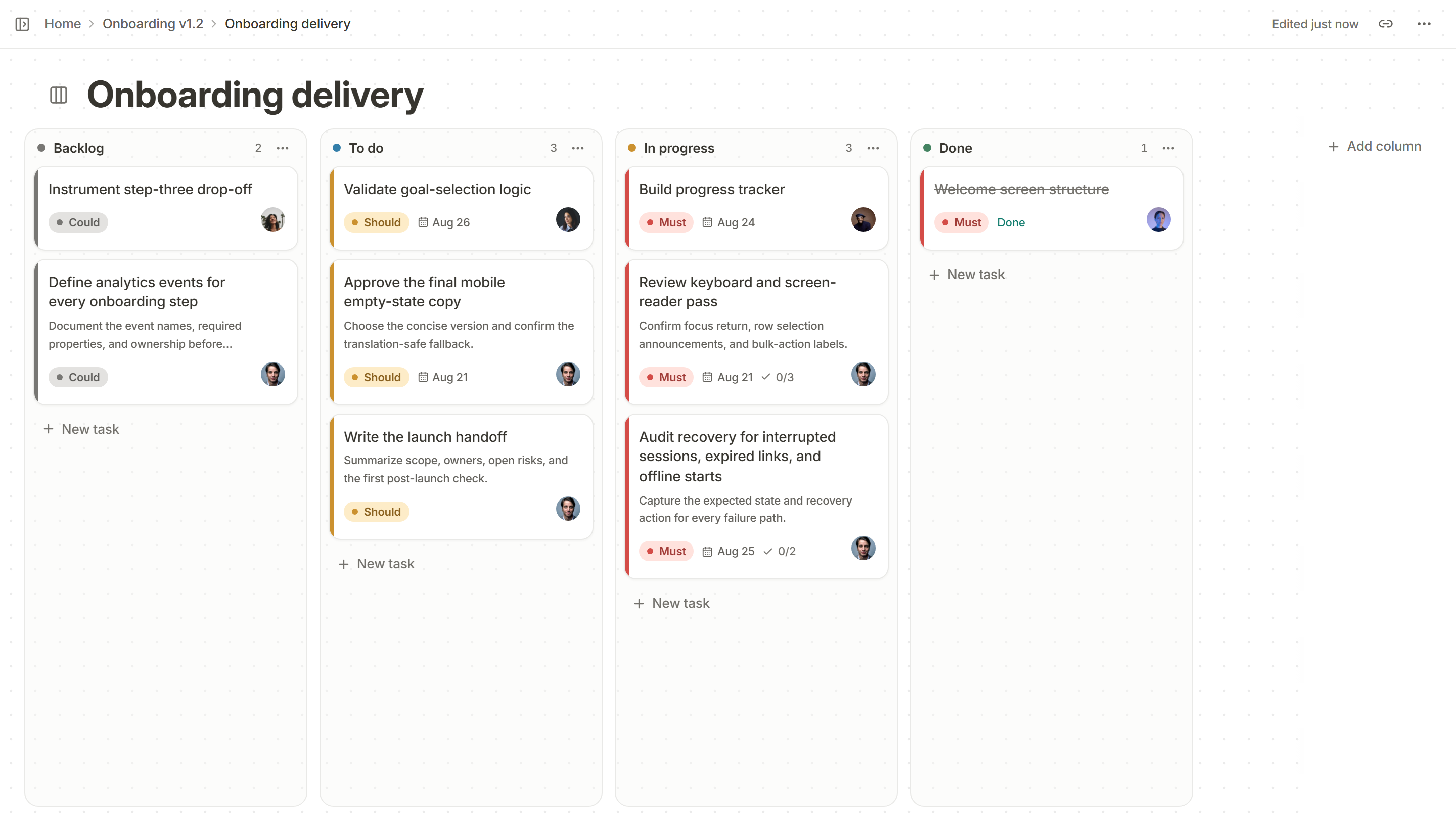
Before you create the board
Sit down for twenty minutes with the people who do the work and trace one piece of work from idea to shipped. Write down each place it waits and each hand-off. That list is your draft columns. Starting from a template instead of your own process is the most common reason a board is abandoned after a month.
The eight steps
- Map the real workflow. Use the stages work actually passes through, not the ones in a process document.
- Choose the columns. Fewer is better. Four to six columns cover most teams.
- Decide what a card is. One task a person can finish in a few days. Bigger items become several cards or a spec.
- Set work-in-progress limits. Start with the number of people on a column, or one fewer, and adjust after two weeks.
- Say what “done” means for each column. For example, In review means a pull request is open and tests pass.
- Add the fields that matter. Priority, owner and a due date are enough to begin with. Add more only when someone asks a question the board cannot answer.
- Fill it from the real backlog. Move current work onto the board in one sitting, so the first day is accurate.
- Review it weekly. Ten minutes: what is stuck, what is next, what can be removed.
Column sets to start from
| Team | Columns |
|---|---|
| A small product team | Backlog, To do, In progress, Done |
| A team with code review and QA | Backlog, To do, In progress, In review, Testing, Done |
| A support or bug team | Reported, Triaged, Fixing, Verify, Done |
| A design and content team | Ideas, Drafting, Feedback, Approved, Published |
A small product team
Columns
Backlog, To do, In progress, Done
A team with code review and QA
Columns
Backlog, To do, In progress, In review, Testing, Done
A support or bug team
Columns
Reported, Triaged, Fixing, Verify, Done
A design and content team
Columns
Ideas, Drafting, Feedback, Approved, Published
Habits that keep a board honest
- The board is the plan. If work is happening that is not on it, add it or stop doing it.
- Move your own card the moment the work changes state, not at the end of the day.
- Archive finished cards on a schedule, so Done does not become a graveyard.
- When a column is over its limit, the team stops starting and helps finish.
Signs the setup is wrong
- Cards sit in one column for weeks. The column hides a hand-off nobody owns.
- Everything is marked urgent. Use Must, Should and Could so order means something.
- Nobody trusts it, so there is a second spreadsheet. Find out what the board cannot answer and add that field.
A plan for the first two weeks
| When | What to do |
|---|---|
| Day 1 | Map the workflow with the team, create the board and move the current work onto it |
| Day 2 | Agree who moves cards, and say what each column means in one line |
| End of week 1 | Look at which column holds the most cards. That is where work is waiting |
| Day 8 | Set a first limit on that column, and say what the team does when it is reached |
| End of week 2 | Review: which columns are unused, which rules are ignored, what is missing |
Day 1
What to do
Map the workflow with the team, create the board and move the current work onto it
Day 2
What to do
Agree who moves cards, and say what each column means in one line
End of week 1
What to do
Look at which column holds the most cards. That is where work is waiting
Day 8
What to do
Set a first limit on that column, and say what the team does when it is reached
End of week 2
What to do
Review: which columns are unused, which rules are ignored, what is missing
Adapting the board to other teams
The same method works outside software. A design team might use Ideas, Sketching, Review and Approved. A support team might use New, Waiting on us, Waiting on customer and Solved. A marketing team might use Brief, Draft, Review, Scheduled and Published. In each case, the columns are the real stages work passes through, and the limits go where work piles up.
Metrics to look at after a month
- How long did cards take from started to done, and is it getting steadier?
- Which column did cards wait in longest?
- How many cards were open at the end of each week?
- How many cards were added mid-week, and how many of those were really urgent?
Setting it up in Kanso
Create a board page in your project and rename the columns to match your process. Cards carry a priority (Must, Should or Could), owners, a due date and acceptance criteria. Put a limit on a column to be warned when it is passed. If you want another view of the same cards, switch to the table, list, timeline or calendar view and save it. See Kanso Boards.