What a kanban board is
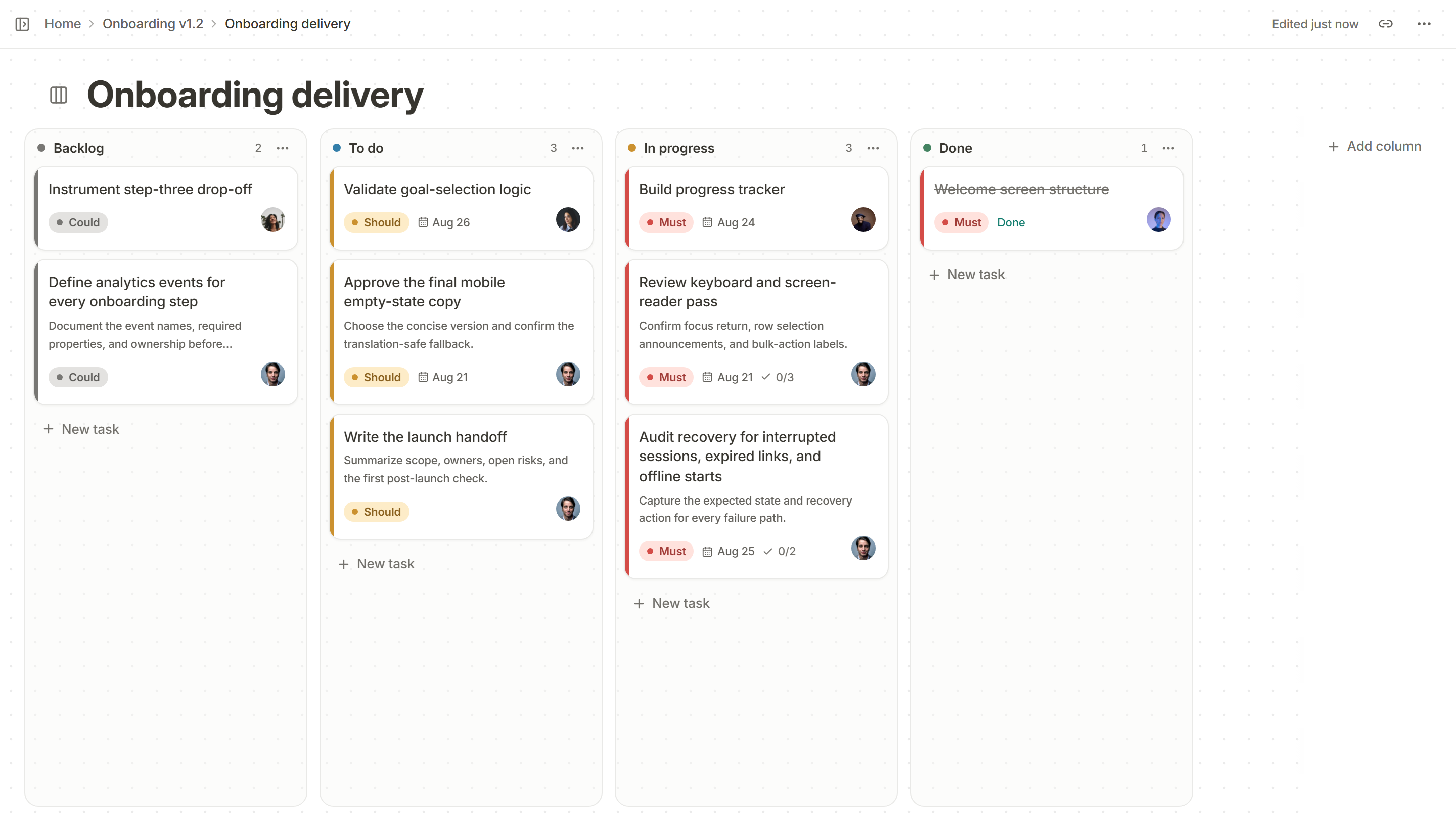
A kanban board is a visual map of work. Each piece of work is a card. Each stage the work passes through is a column. Cards move from left to right as the work moves on, so anyone can see what is waiting, what is being done and what is finished without asking.
“Kanban” is the Japanese word for a visual signal or card. The method comes from the Toyota production system, and software teams adopted it because software work is also invisible until you draw it.
The parts of a board
- Cards are single pieces of work: a task, a bug, a small feature. A good card is small enough to finish in days, not weeks.
- Columns are the stages of your real process, for example To do, In progress, In review and Done.
- Work-in-progress limits cap how many cards can sit in a column at once. They are what turns a board from a list into a system.
- Priorities and owners say which card matters most and who is doing it.
The four habits of kanban
- Make the work visible. If it is not on the board, it is not being tracked.
- Limit work in progress. Finish things before starting new ones. Too much in progress means everything is slow.
- Manage the flow. Watch where cards pile up. A pile is a bottleneck, and the bottleneck is where to put effort.
- Improve it a little at a time. Change one rule, see what happens, repeat.
Kanban and scrum
Kanban and scrum are often compared. Scrum organizes work into fixed-length sprints with set roles. Kanban has no fixed cycle: work flows continuously and the limits keep it steady. Many teams mix the two.
| Kanban | Scrum | |
|---|---|---|
| Rhythm | Continuous flow | Fixed-length sprints |
| Roles | None required | Product owner, scrum master, developers |
| Changing the plan | Any time, if a slot is free | Protected during a sprint |
| Main measure | Time a card takes to finish | Work completed per sprint |
Rhythm
Kanban
Continuous flow
Scrum
Fixed-length sprints
Roles
Kanban
None required
Scrum
Product owner, scrum master, developers
Changing the plan
Kanban
Any time, if a slot is free
Scrum
Protected during a sprint
Main measure
Kanban
Time a card takes to finish
Scrum
Work completed per sprint
A board for a software team
A common setup is Backlog, To do, In progress, In review and Done. Add a column only when work genuinely waits there: a column nobody uses is noise. Put a limit on In progress and In review first, because that is where work tends to pile up.
When a kanban board works best
- Work arrives unpredictably, like support requests, bugs and small improvements.
- The team wants to see the whole picture without ceremonies.
- People are tempted to start many things and finish few.
It works less well as the only tool for long projects with many dependencies. There, pair the board with a release page that shows the dates and what is blocked.
The numbers worth watching
A board produces data for free. You do not need dashboards; you need three numbers and the habit of looking at them.
| Measure | What it is | What it tells you |
|---|---|---|
| Cycle time | How long a card takes from started to done | How predictable the team is, and where work waits |
| Work in progress | How many cards are started and not finished | Whether the team is starting more than it finishes |
| Age of work in progress | How long each open card has been open | Which cards are stuck right now |
Cycle time
What it is
How long a card takes from started to done
What it tells you
How predictable the team is, and where work waits
Work in progress
What it is
How many cards are started and not finished
What it tells you
Whether the team is starting more than it finishes
Age of work in progress
What it is
How long each open card has been open
What it tells you
Which cards are stuck right now
Start with the third. Walk the board each morning from right to left, from nearly done to just started, and ask of each old card: what would it take to finish this today?
Swimlanes, and when to skip them
A swimlane is a horizontal band across the board that groups cards, for example by team, by product area or by kind of work. They help when several teams share one board and need to see their own work. They hurt when they multiply: a board with four columns and six lanes is a table nobody reads. Prefer filtering or saved views to extra lanes.
Common mistakes
- Cards that are really projects. A card that stays in progress for a month is a project. Break it into cards that finish.
- A Done column that is never cleared. Archive finished work on a schedule, so Done shows what happened this week.
- No limit anywhere. Without a limit, a board is a to-do list with extra steps.
- One person updating everyone’s cards. If the board is kept by a manager, it will be out of date by lunch. Everyone moves their own.
A kanban board in Kanso
Every project can hold a Kanso board: columns you name, cards with a priority, an owner, a due date and acceptance criteria, and a work-in-progress limit on a column that warns when it is passed. The same cards also open as a table, list, timeline or calendar, so you can look at the work the way you need. See how to set up a kanban board.